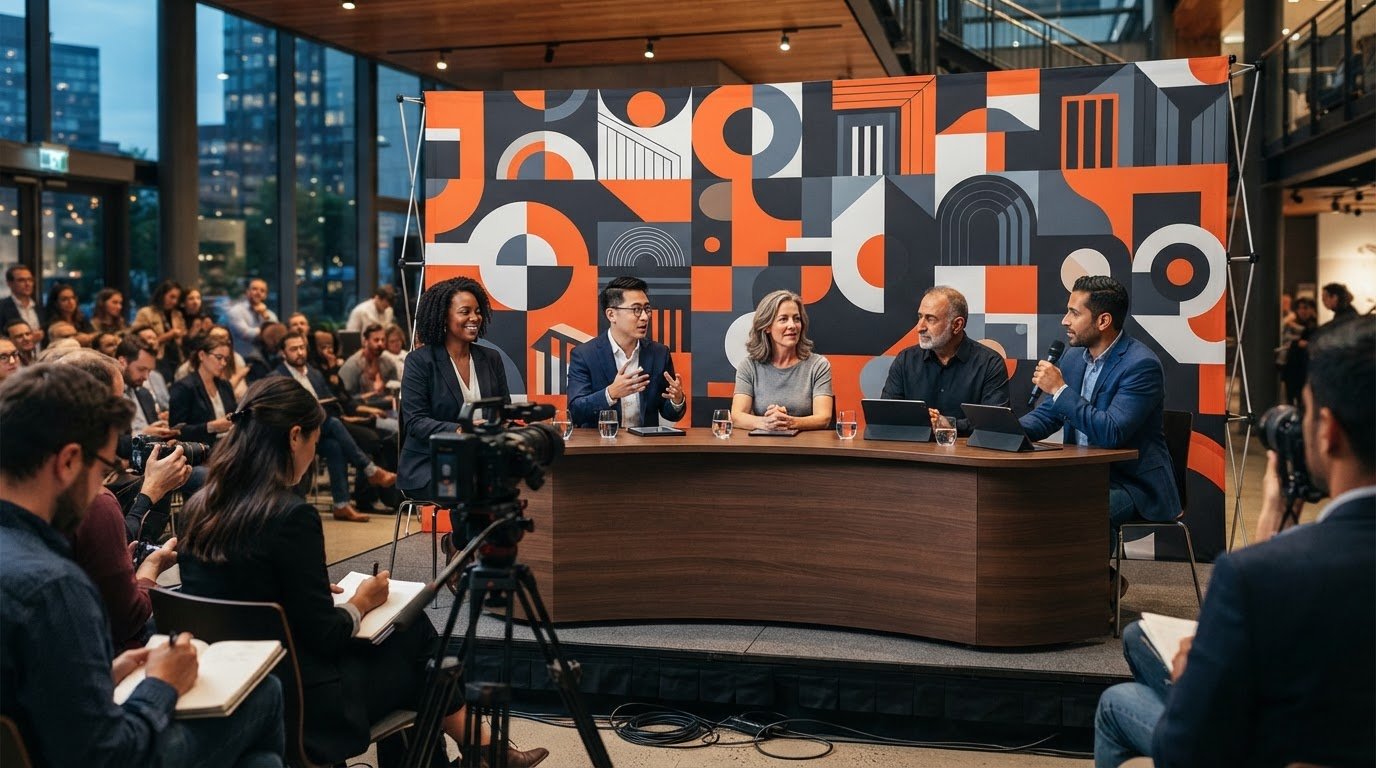
What if the best media wall for press events were designed around the camera frame, not just the room? A backdrop can look impressive in person and still miss the mark in photos if logos sit behind speakers, sponsors fall outside the shot, or the design feels crowded on screen. The right format and careful placement help keep your brand clear in every frame.
Balance visual impact with practical needs such as venue layout, portability, and setup time. This guide compares step-and-repeat and full-graphic backdrops, explains how to plan around camera views, and covers artwork preparation to help avoid last-minute surprises. Zodiac Event Displays’ portable Expanding Backwalls, with reusable frames and interchangeable fabrics, can support repeat events. Start with your brand priorities, then bring the design and production details together.
Key Takeaways
- Choose the backdrop format to match the press coverage: repeating logos, a full graphic, or a sponsor-focused layout each supports different visual priorities.
- Plan your media wall for press events around the intended shots, camera positions, and speaker placement so key branding stays in frame.
- Map venue measurements, access routes, interview positions, setup timing, and team responsibilities before artwork moves into production.
- Prepare print-ready artwork with vector logos, Pantone color references, and the correct file specifications to help avoid production surprises.
- Consider an Expanding Backwall when a portable fabric backdrop suits the brief, with a reusable frame and interchangeable graphics for repeat events.
What Is a Media Wall for Press Events, and What Should It Do?
A media wall for press events is a branded background positioned behind speakers, guests, or products to establish visual context in event photography and video. It can feature at a press conference, product launch, interview area, award announcement, or photo call, providing a consistent backdrop for images and footage.
The goal isn’t simply to fill a blank wall. A well-planned backdrop supports the story, gives the camera a clear setting, and places the right brand or sponsor details where they can be seen. That might mean repeating a company logo, featuring a campaign graphic, or arranging sponsor marks in a clear visual hierarchy.
Terminology can cause confusion: “media wall” can also describe a multi-screen display, such as the Video wall concept. In event branding, however, people often use “media wall” for a printed or fabric backdrop designed for press coverage. A step-and-repeat is one graphic approach to that backdrop, typically using a repeated logo pattern. It isn’t a synonym for every media wall.
Which press events benefit from a dedicated media wall?
Sponsor recognition calls for a different balance than a single-brand announcement. A sponsor-focused background should give partner logos enough space and scale to be recognizable without making the image feel cluttered. For a focused interview or announcement, one primary brand or message may deserve more visual weight. Match the backdrop to the event’s purpose and the coverage it needs to support.
Media wall graphic versus display structure: what is the difference?
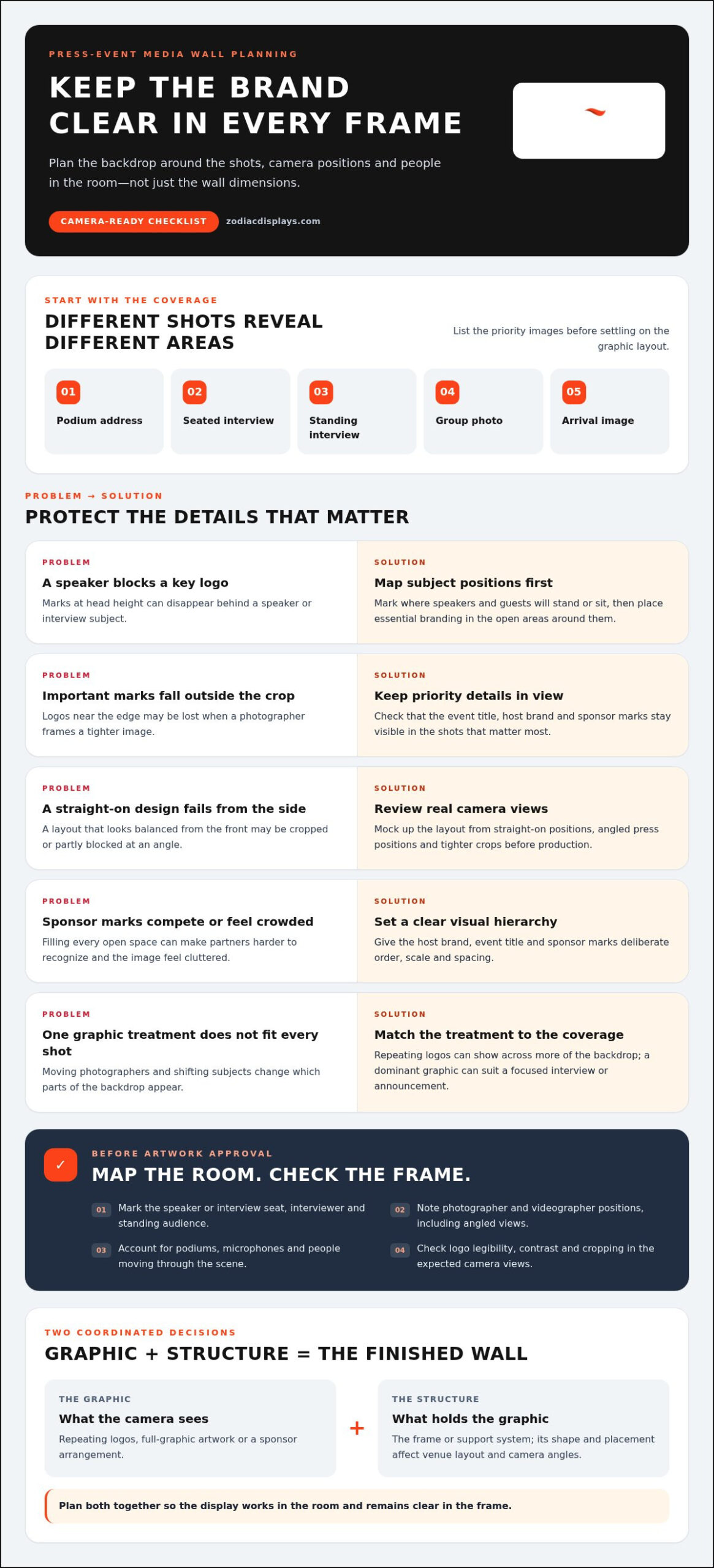
Think of the media wall as two coordinated decisions: the graphic and the structure that displays it. The graphic might use repeating logos, full-graphic artwork, or a sponsor arrangement. These treatments serve different priorities, so consider how each will read on camera before choosing.
The structure is the frame or support system holding the printed graphic or fabric. Its shape and placement affect the venue layout and camera angles. A design that looks balanced straight on may be cropped from the side or partly blocked by a speaker. Plan the graphic and structure together so the finished display feels intentional both in the room and in the frame.
How a Press-Event Media Wall Shapes Photos, Interviews, and Brand Visibility
Start with the shots the event needs, not a guess at how much wall space is available. A podium address, seated interview, standing interview, group photo, and arrival image each frame the background differently. A wide group shot may show most of the display, while a close interview crop may include only the area around a speaker’s head and shoulders. List the priority images before settling on the graphic layout.
A camera-ready backdrop is planned around expected shots, not just wall dimensions. Camera distance and framing affect how much of the design appears, while the speaker’s position determines which logos may be blocked. If the display will be photographed from several positions, make sure the composition still reads from the front, from the side, and in a tighter crop.
How should logos and sponsor marks appear in press photos?
Give the host brand, event title, and sponsor marks a clear order of importance. A logo placed at head height may disappear behind a speaker; one near the edge may be lost when a photographer crops the image. Mark likely subject positions first, then keep essential marks in the open areas around them. This helps prevent an important partner or message from vanishing in the most-used shots.
Repeating logos can work well when photographers move and subjects shift between shots, because branding appears across more of the backdrop. For a controlled interview or focused announcement, a single dominant graphic may tell the story more clearly. Sponsor layouts need deliberate spacing and scale so partners are recognizable without competing with the event identity. Don’t fill every open space simply because it’s available.
What camera and audience positions should the layout account for?
Map the room before approving artwork. Mark the speaker or interview seat, interviewer, photographers, videographers, and standing audience. Note where cameras will shoot from, including straight-on positions and angled views from the press area or sides of the room. Consider whether a podium, microphone, or people moving through the scene could cover important parts of the design.
Then review a mock-up from the main camera positions. Check whether logos remain legible at the expected distance, whether contrast holds up on screen, and whether a crop cuts off the event title or partner marks. A front-facing mock-up alone can hide problems that show up at an angle. Adjust the layout before production, while repositioning artwork is still straightforward.
For a media wall for press events, these decisions connect the graphic to the real conditions of the room. Zodiac’s custom event branding support can help align the artwork with camera views and brand priorities, so the display feels considered both on site and in coverage.
Step-and-Repeat or Full-Graphic Media Wall: Which Fits Your Press Event?
Choose the graphic approach by asking what the camera should communicate first. A repeating logo pattern helps keep brand marks visible across changing photo positions. Full-graphic artwork gives a campaign image, product, or event message more room to lead. A sponsor-focused layout balances several partners, often alongside the host brand. Each approach can work well, but each creates a different visual hierarchy.
Use this comparison to narrow the brief. The best option depends on the intended shots, the number of brands to feature, and how much camera positions will vary.
| Graphic approach | Photo visibility | Message hierarchy | Interview fit | Camera flexibility |
|---|---|---|---|---|
| Repeating logos | Branding recurs across the backdrop | One or more marks repeat without a single central message | Useful when interview positions may shift | Adaptable to varied crops and angles |
| Full-graphic artwork | A key image or message takes visual priority | One event, campaign, or product story leads | Strong for a controlled interview or announcement | Works best when planned camera views preserve key elements |
| Sponsor-focused layout | Partner marks are intentionally distributed | Host identity and sponsor recognition are balanced | Can suit interviews where partners need visibility | Requires careful spacing for varied crops |
These are graphic choices, not frame types. A repeating pattern or full-graphic design can be applied to a suitable display structure; a media wall doesn’t have to be a rigid wall. The frame style and venue layout affect how the graphic sits in the space and appears from different camera angles. Production requirements also depend on the project’s dimensions, materials, artwork, and display specifications, so avoid choosing a format based on price assumptions alone.
When does a step-and-repeat backdrop make the stronger press photo?
A step-and-repeat is a strong choice when photographers may capture subjects from several positions, since recurring marks can remain visible across different crops. It can also suit sponsor-heavy events where partner logos need repeated exposure. Repetition alone, though, won’t guarantee a clear image. Set logo scale and spacing for the expected camera distance, and check that marks won’t land behind heads or outside likely crop areas.
When does a full-graphic media wall make more sense?
Choose full-graphic artwork when one event message or visual concept should dominate, such as a product announcement with a controlled interview position. Keep the host identity readable and place key elements where speakers and camera framing won’t obscure them. For broader exhibit environments, custom trade show display planning can help connect the press backdrop to the surrounding brand presentation.
For a media wall for press events, begin with the coverage plan, then select the graphic style and display structure that support it. This keeps visual impact, brand clarity, and practical production needs working together.
Planning a Press-Event Media Wall: Brief to Artwork
A smooth production process starts before anyone opens a design file. Align the event team on what the backdrop needs to communicate, where it will stand, and how it will appear in the planned coverage. Then work through the decisions in order, from event brief to setup plan, so artwork and logistics develop together.
- Brief the event. Record its purpose, audience, host-brand priorities, sponsor obligations, and the moments the backdrop must support, such as interviews or a podium announcement.
- Map the shots and space. Note interview and speaker positions, camera sightlines, venue measurements, available space, access routes, and the display location.
- Select the graphic approach. Choose repeating logos, full-graphic artwork, or a sponsor-focused layout according to the message and expected coverage.
- Prepare production artwork. Confirm the display dimensions and product-specific template before finalizing the layout. Check colors, image links, type, and bleed against the requirements below.
- Plan the setup. Share the event schedule, access arrangements, setup timing, and named event-team contacts responsible for the venue, artwork, and display.
What should the event brief specify before design begins?
Make the brief specific enough to guide both design and production. List the event purpose, audience, brand hierarchy, sponsor commitments, and intended photographic moments. Add venue measurements, backdrop location, available space, camera sightlines, and setup access details. Confirm the chosen display’s dimensions and use its product-specific template before finalizing artwork, so important content stays within the usable area.
How should artwork be prepared for a media wall?
Accepted artwork formats are Adobe Illustrator AI, PDF, EPS, and Adobe Photoshop files. InDesign files aren’t accepted. Supply PC-compatible files and link image files separately rather than embedding them. Use Pantone references for accurate color matching; CMYK may vary, so verify a match with a Pantone guide. Gold and fluorescent Pantones in the 800 series can’t be printed. For photos and other raster images, use 72-100 ppi at 100% of final print size, not 300 ppi. Don’t send GIF, PNG, or TIFF files for banners.
Run this preflight before sending artwork:
- Convert text to outlines or curves, or supply the font file. Save typographic logos as outlines, and use vector artwork for logos rather than raster or scanned versions.
- Keep line thickness at or above 0.1 inches.
- Use bleed from 0.7 to 3 inches, depending on the product. Plain banners require 2 inches on every side.
- Keep template markings visible as references; don’t flatten them into the artwork.
- Keep Photoshop files to five layers or fewer at 72 ppi, and link images instead of embedding them.
For a media wall for press events, a clear brief and careful file check help carry the camera plan through to production. Plan your press-event backdrop with Zodiac and bring the event’s visual priorities into focus.
Create a Press-Event Media Wall with Zodiac’s Expanding Backwalls
A polished press backdrop needs more than a strong graphic. It needs a display format that suits the venue, supports the camera plan, and fits the event team’s setup schedule. When a branded fabric backdrop meets those needs, Zodiac’s Expanding Backwalls offer a portable option with a reusable frame and full digital graphic skin.
The design and display work together. Zodiac’s custom design support can translate the event brief into artwork that places key branding where it will appear in planned interviews and photographs. Consider speaker positions and camera views as the graphic takes shape, rather than treating design as a separate finishing step.
What makes an Expanding Backwall relevant to a press event?
The frame uses an accordion-style aluminum structure that expands into shape for setup. Its portable design suits event teams working within a schedule and moving display materials between venues. Once expanded, the full digital graphic skin attaches to the frame with Velcro, creating a continuous branded fabric backdrop for a planned interview area, announcement, or photo opportunity.
Expanding Backwalls are available with straight or curved frames. The choice can help the display work with the room layout and intended camera views. A straight frame may suit a flat-wall position, while a curved option can shape the backdrop around the coverage area. Make the frame choice part of the event plan, accounting for placement and available space.
For repeat events, the frame is reusable and fabrics can be changed. A team can refresh the graphic for a new launch, announcement, or sponsor lineup while retaining the frame. That gives the backdrop a practical role beyond one press date, while allowing each event’s artwork to reflect its message and brand priorities.
How does Zodiac support the project from concept through delivery?
Zodiac manages design, print, fabrication, and delivery, bringing the visual brief and production details together. With over ten years of experience in soft signage and event branding, the team can help shape artwork around the intended shots, event identity, and sponsor needs. The result is a considered project, not simply a frame paired with a graphic.
Zodiac’s client experience includes Garmin and Mercedes-Benz. These are examples of organizations it has worked with, not claims of endorsement for Expanding Backwalls. For a broader view of Zodiac’s event branding and display capabilities, explore the company’s offerings and approach.
If an Expanding Backwall suits your press-event brief, discuss your project with Zodiac. Share the event purpose, venue plan, camera positions, and key branding priorities to start a focused conversation about the display and artwork.
Make Your Next Press Moment Count
Before the next announcement or interview, bring the communications, event, and brand teams together around one question: what should viewers notice first? Agreeing on that priority early gives everyone a clear standard for reviewing the backdrop, from the first layout to the final room setup. It also helps keep last-minute edits focused on the story, rather than personal preference.
A media wall for press events can do more than fill the frame. Thoughtfully planned, it becomes part of how your organization presents itself to journalists, partners, and audiences watching the coverage later. Include the camera plan in the creative conversation, and your brand can show up with greater clarity and confidence.
Ready to shape a backdrop around your event’s message and camera views? Discuss your press-event media wall project with Zodiac and take the next step toward a polished press moment.
Frequently Asked Questions
What is a media wall for a press event?
A media wall is a branded backdrop positioned behind speakers, interview subjects, or people posing for event photos. It gives press images and video a consistent visual setting, helping identify the organization or announcement being covered. “Media wall” describes the backdrop’s role at the event; “step-and-repeat” describes one possible graphic style. Plan the printed graphic and supporting structure as related but separate choices, so each suits the venue and coverage.
Is a step-and-repeat the same as a media wall?
Not exactly. People sometimes use the terms interchangeably, but a step-and-repeat is a media-wall design with logos or marks repeated across the graphic. Other media walls can feature a single campaign image, event artwork, or a layout organized around several sponsors. Choose by considering what should stand out in press photos, how the host and partners rank visually, and whether photographers will shoot from several positions.
How large should a media wall be for a press conference?
There’s no universal size that suits every press conference. Base dimensions on the venue, speaker placement, expected camera distance, number of people who may appear together, and available setup space. For example, a backdrop for one podium speaker may need a different composition than one intended for a panel. Sketch the main shots in the room, then check the planned display area before finalizing artwork dimensions.
Can a media wall be used for interviews and video?
Yes. Media walls are commonly used for broadcast interviews and video coverage, provided the graphic uses a glare-free matte finish suited to camera lighting. For events that also incorporate live broadcast feeds, confidence monitors, or signal routing, sourcing professional audio-visual gear from HDTV Supply helps ensure the technical production runs as smoothly as the visual presentation.
How do you design a media wall for press photos?
Start with the images the event needs, such as a tight spokesperson portrait or a wider two-person interview. Match the graphic style to the host’s message and sponsor commitments, then position essential marks away from likely head positions and photo crops. Review a mock-up at the intended viewing scale, not just on a laptop. Before production, compare the final layout with the selected display’s template and file requirements.
What file format should I use for media-wall artwork?
Zodiac accepts Adobe Illustrator AI, PDF, EPS, and Adobe Photoshop files; InDesign isn’t accepted. Supply PC-compatible artwork and link images as separate files rather than embedding them. Photos should be 72-100 ppi at full print size, with type converted to outlines or the font file supplied. Use Pantone references for accurate color matching, and follow the product-specific template for bleed, since the required amount varies by display.
 Previous reading